
Running an Internet Radio Stream from YouTube
It can be done in 1 line of bash, seriously its that easy...
One of the features I liked about Spotify and that I miss since swapping to YouTube Music is Jam/Group listening sessions where playback is synced between multiple users. Sometimes its nice to listen to the same music as others, really a nice feature if you have a shared playlist with friends.
The Requirements
Ok so lets first go over my specific use-case, I want a system where multiple users can play some stream of audio relatively in sync. Ideally, its a solution that is lightweight and cheap to host as it is something to be used among small groups of people.
One of the “band-aid” solutions to this is to use a “music bot” on a VoIP platform such as Discord or Teamspeak. This simplifies the problem a lot since there are already plenty of pre-built solutions for this. However, the biggest problem with this approach is that you would need to stay in voice communication with the bot to be able to hear any music. This is rather inconvienent for listening on-the-go.
Another option I thought of would be to run another Icecast or Shoutcast station, similar to what I’ve got with Patchwork Radio which is running Azuracast. However, considering that this is really meant to be personal use only, setting up either of these solutions seem super overkill (and Icecast/Shoutcast isn’t the easiest thing to setup either).
How does Internet Radio work?
Audio streaming is actually very simple. The best way to think of it is as an “endless file”.
Say I were to send you a link to an MP3 file and you put it into your music player of choice:
http://server:8000/radio.mp3My server sees it and responds with the file:
HTTP/1.0 200 OK
Content-Type: audio/mpeg
Your player downloads and plays the file. Once it reaches the end playback stops
But if I were to change my backend to make /radio.mp3 a live audio source…
- There is no file on disk
- Instead I have some software (such as Icecast) continuously writing MP3 frames (think of it as the next segment of the audio) to that endpoint
- Your player decodes these frames and plays them back, while going back to fetch the next frame.
By not specifying a Content-Length: XXXXX header, it makes your player continuously ask for the next part since it doesn’t really know when the file will end. This gives the illusion of playing a normal MP3 file while allowing it to actually be an endless stream.
Server: Here is audio.
Client: Playing.
Server: More audio segments.
Client: Still playing.
Server: More audio segments.
Client: Still playing.
...
How?
So really, all we need to do is to figure out how to generate these frames, luckily this is where something like ffmpeg can greatly help us out.
ffmpeg -re -stream_loop -1 -i audio.mp3 -f mp3 -b:a 192k -content_type audio/mpeg -listen 1 http://0.0.0.0:8000In the command above ffmpeg takes some local file audio.mp3 and pushes/serves it to port 8000. Seriously go try this out, as you run this command open localhost:8000 in your browser and you’ll hear your audio file being streamed in real time. ffmpeg does all the heavy lifting here!
Ok but I don’t have that much music downloaded
That’s where yt-dlp comes in. Instead of keeping the file locally we can pipe audio directly from yt-dlp into ffmpeg. This means we have a lot of music, we don’t need to store them locally, we can have the server stream them on demand (from YouTube or another source supported by yt-dlp).
yt-dlp -f bestaudio -o - "YOUTUBE_URL" | ffmpeg -i pipe:0 -f mp3 -b:a 192k -content_type audio/mpeg -listen 1 http://0.0.0.0:8000Quick Script
So that also means that its ridiculously easy to run a mini-radio sort of thing. The script below will get you going with a working radio that can cycle through a list of urls.
#!/bin/bash
PORT=8000
BITRATE=192k
URLS=(
  "https://www.youtube.com/watch?v=VIDEO_ID_1"
  "https://www.youtube.com/watch?v=VIDEO_ID_2"
  "https://www.youtube.com/watch?v=VIDEO_ID_3"
)
while true; do
  for URL in "${URLS[@]}"; do
    echo "Now streaming: $URL"
    yt-dlp -f bestaudio -o - "$URL" | \
    ffmpeg -re -i pipe:0 \
      -f mp3 -b:a $BITRATE \
      -content_type audio/mpeg \
      -listen 1 \
      http://0.0.0.0:$PORT/stream.mp3
    echo "Track ended. Moving to next..."
    sleep 1
  done
done
My Solution
In case you haven’t realized this is incredibly powerful. I don’t need to pre-download all the media I want to stream, everyone can access the audio stream on the same URL, and also of course meets the requirement for shared playback. This also means that we can use the resulting audio stream on existing Discord/Teamspeak music bots to build one of those 24/7 radios.
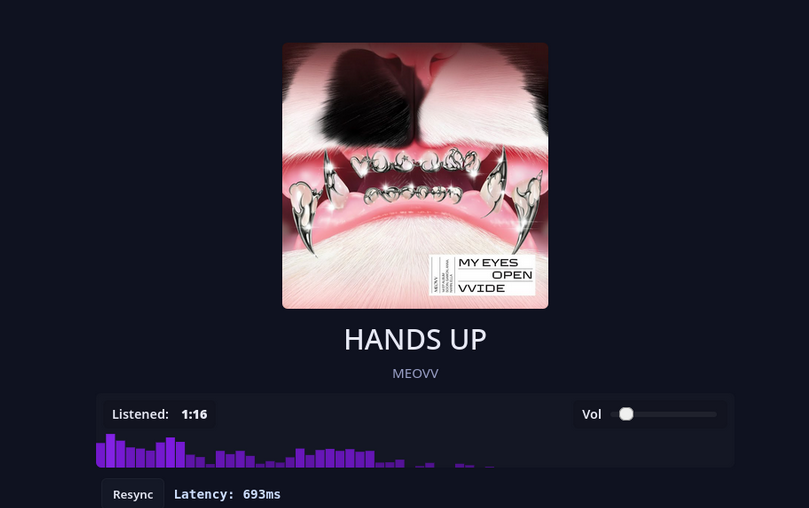
I’ve expanded on this idea and wrote a Flask app that expands on this same idea here. At the core, it takes a YouTube playlist and converts it into a list of urls to be played on loop. I’ve also built a few QOL features such as stopping stream when no one is listening (to save bandwidth), injecting icy metadata tags into the audio so that your favorite player can show what song is playing, and a webui for browser-based playback and visualization.
You can check it out here: https://github.com/pinapelz/yt-playlist-radio
Caveats
Many audio players pre-buffer audio from the server so that you can have a smoother playback. This means technically speaking your playback will be more and more out of sync than new users joining. This can be solved with enforcing not pre-buffering on the backend, but it may come at the cost of smooth playback.
If you go with the yt-dlp method, YouTube and other providers may throttle your connection which could get annoying (although this is a common cat and mouse game yt-dlp users know all too well)